MAXIMIZE FPS.
ELIMINATE LATENCY.
The 100% free Windows gaming optimization suite engineered by Samir Masoud. Eliminate mouse input lag with MSI Mode, unpark CPU cores, apply deep GPU tweaks, and clean memory with zero paywalls.
ENGINEERED FOR MAXIMUM PERFORMANCE
Everything you need to extract the absolute maximum frame rate and lowest latency from your PC hardware.
Extreme Power Engine
Force maximum CPU core unparking, lock processor boost clocks, and disable power throttling for smooth frametimes.
MSI Interrupt Latency Mode
Convert legacy GPU and USB peripheral interrupts to Message Signaled Interrupts (MSI) to drop mouse response time under 0.5ms.
Deep GPU & Driver Tweaks
Configure hidden GPU driver latency flags, disable HD Audio overhead, and optimize shader cache size for stutter-free gaming.
Smart RAM Purge
Trim working set memory and purge clogged Windows standby cache with 1-click to eliminate micro-stutters in open-world games.
Safe Windows Debloater
Safely disable background telemetry, tracking services, and unwanted apps while keeping Microsoft Store and Xbox intact.
1-Click Restore Safety
Automatically creates an official Windows System Restore Point prior to applying optimizations so you can easily revert anytime.
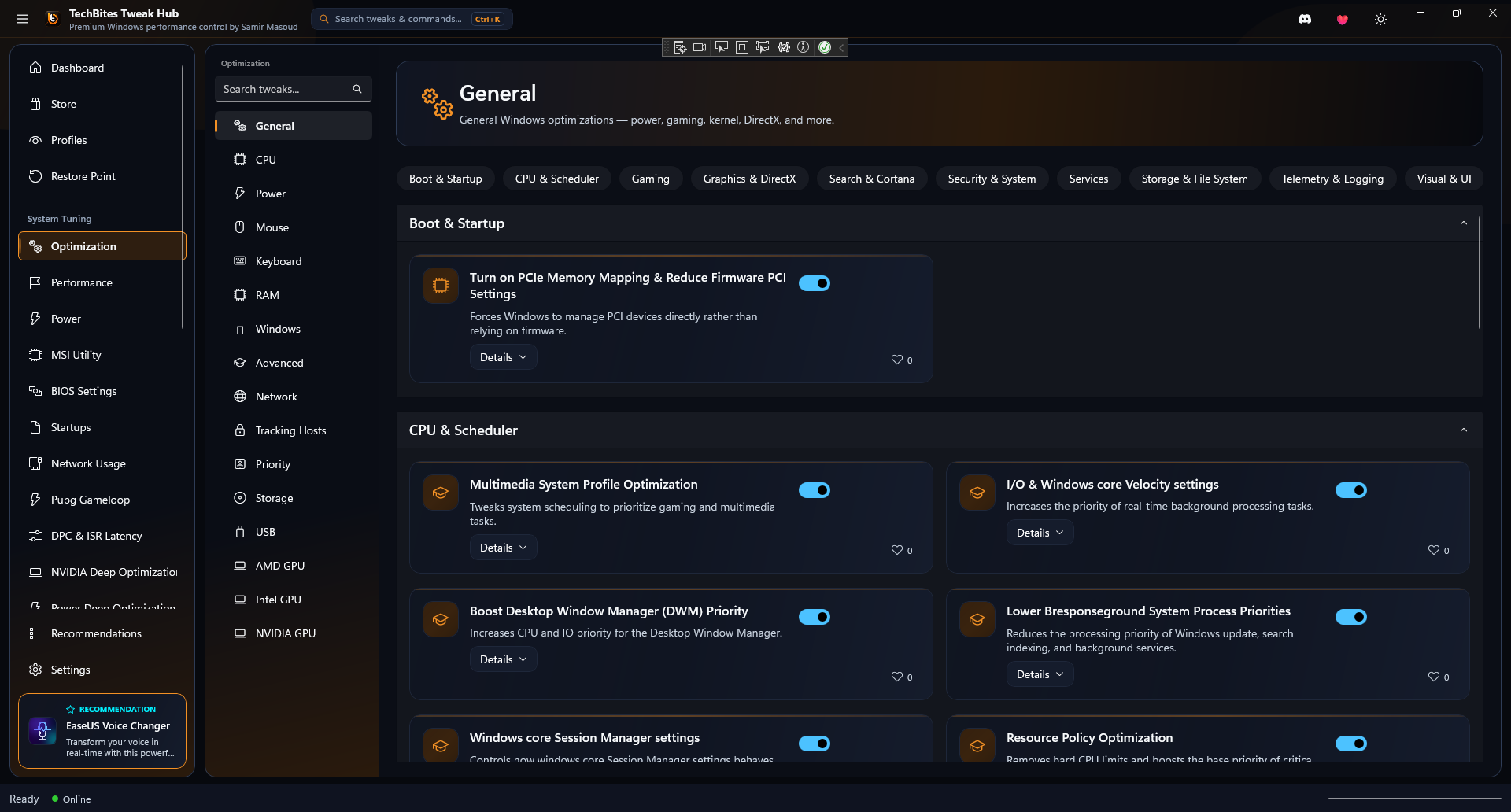
REAL APP INTERFACE
Browse unedited screenshots of Tech Bites Hub running on Windows 11. Click to expand full resolution.
BEFORE VS AFTER RESULTS
Drag the split slider to compare real in-game frame rates and latency drops with Tech Bites Hub.


100% VERIFIED & CLEAN
Scanned across 70+ security engines. Zero adware, zero miners, 100% anti-cheat safe.
TechBites_Hub_Setup.exe (v3.0)
Tech Bites Hub modifies Windows registry keys and power plans. A single vendor out of 71 security engines flagged a generic heuristic rule due to registry adjustments. The software is completely safe and open-source.
Zero Malware or Miners
No spyware, no telemetry injectors, and no background cryptominers. 100% clean code.
Anti-Cheat Compliant
Operates purely at Windows system driver priority levels. Safe with Vanguard, EAC & BattlEye.
Automatic Restore Point
Creates an official Windows System Restore Point prior to applying tweaks for instant rollback.
ENGINEERED BY SAMIR MASOUD
Lead System Architect & Developer of Tech Bites Hub. Passionate about low-latency software and zero-compromise gaming performance.

SAMIR MASOUD
Lead System Architect & Developer of Tech Bites Hub
"Tech Bites Hub was born out of a passion to give every gamer worldwide complete control over their hardware. I engineered this app from the ground up to strip away Windows lag, unlock maximum CPU/GPU frequencies with Extreme Power Engine, and eliminate input latency — completely 100% free forever for all gamers."
FREQUENTLY ASKED QUESTIONS
Straight answers to common questions about safety, performance, and compatibility.
No, 0% chance of a ban. Tech Bites Hub operates exclusively at Windows system, registry, and hardware driver priority levels (like MSI interrupt routing, power plan management, and RAM trimming). It never injects code or modifies game files or memory. It is 100% compliant with Riot Vanguard, Easy Anti-Cheat (EAC), BattlEye, RICOCHET, and VAC.
100% Clean and Verified. Tech Bites Hub contains zero malware, zero adware, and zero background miners. You can scan the setup installer file on VirusTotal or review our official open-source GitHub Repository anytime.
Safety first. Tech Bites Hub automatically creates an official Windows System Restore Point before applying optimizations. Additionally, you can open the Profiles page inside the app at any time and click "Restore Default Settings" to instantly revert all tweaks.
No. Once optimizations (like MSI Mode, Power Plan, or Debloat) are applied, they are written directly to your Windows system configuration. You can close Tech Bites Hub completely before launching your games.
Yes, 100% free forever. Samir Masoud built Tech Bites Hub out of a passion to give every gamer maximum PC performance. All features, store utilities, custom cursors, and wallpapers are completely unlocked with zero paywalls.