DESIGNED & ARCHITECTED BY SAMIR MASOUD

MAXIMIZE FPS.
ELIMINATE LATENCY.
100% FREE.

Tech Bites Hub is the ultimate all-in-one Windows optimization suite engineered by Samir Masoud. Built for competitive gamers to eliminate input lag with MSI Mode, unlock max CPU power with Extreme Power Engine, apply deep NVIDIA tweaks, clean memory, and boost gaming FPS — 100% free forever with zero paywalls.

0.4 ms MSI Latency
Anti-Cheat Safe
100% Free Forever
Verified Release
100% Clean & Virus-Free
100% Free Forever
Win 10 / 11 64-Bit
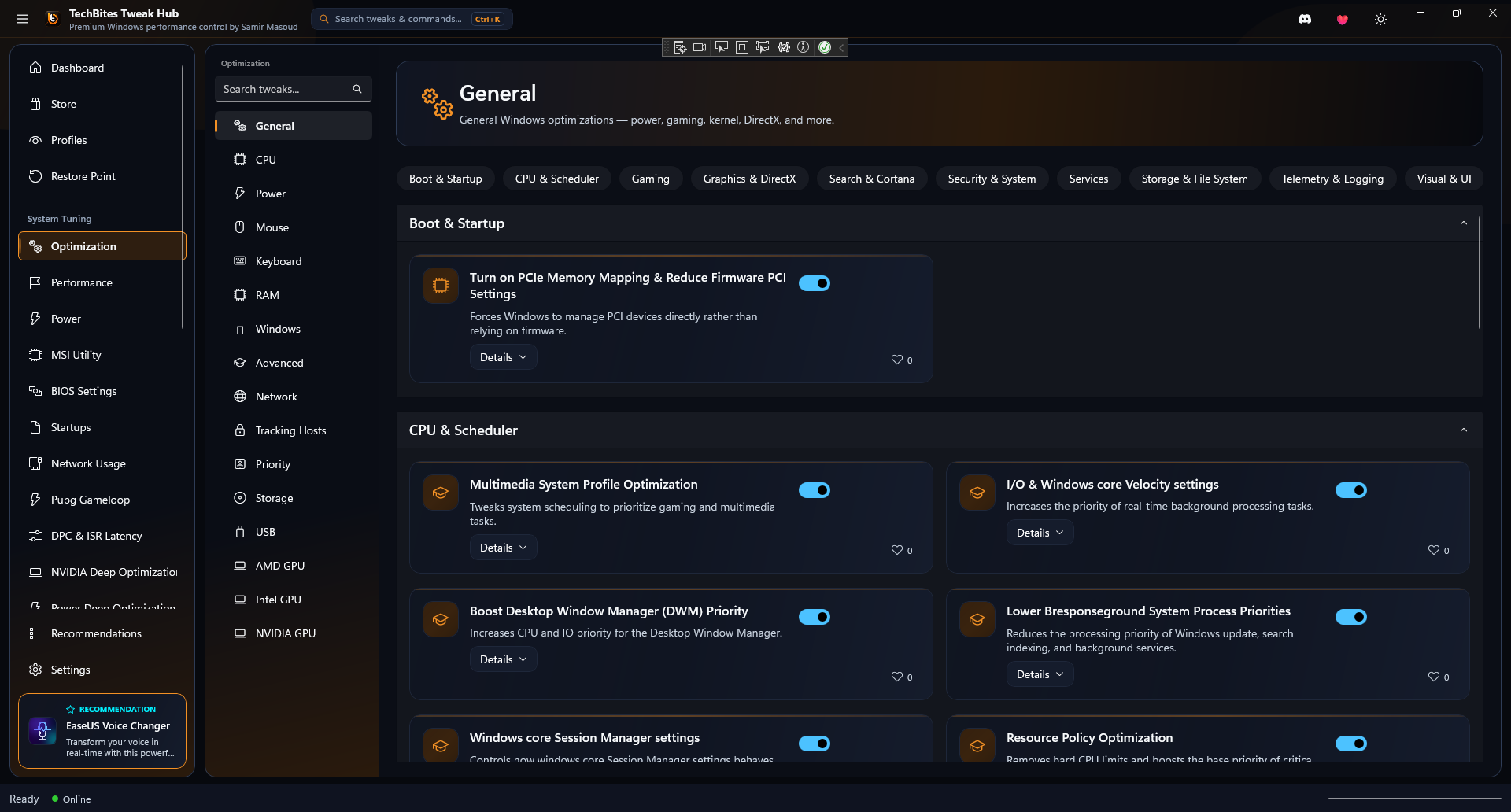
Tech Bites Hub v2.5 — System Optimization & Power Active
Tech Bites Hub App Optimization UI Screenshot
POWER ENGINE 4.90 GHz BOOST
MSI MODE LATENCY 0.4 ms (ULTRA)
100% FREE APP ZERO PAYWALLS
+0%
AVG FPS BOOST
-0ms
INPUT DELAY REDUCTION
0%
FREE FOREVER
0%
SAFE RESTORE SYSTEM

DESIGNED & ENGINEERED BY SAMIR MASOUD

Driven by passion for high-performance computing, competitive gaming, and zero-compromise software engineering.

Samir Masoud - Founder & Lead System Architect of Tech Bites Hub
ARCHITECT ACTIVE
TB-SYSTEM CORE
FOUNDER & LEAD DEVELOPER

SAMIR MASOUD

Lead System Architect & Developer of Tech Bites Hub

0-DELAY KERNEL C# / WINUI 3 / C++ 100% HARDWARE UNLEASHED
"Tech Bites Hub was born out of a passion to give every gamer worldwide complete control over their hardware. I engineered this app from the ground up to strip away Windows lag, unlock maximum CPU/GPU frequencies with Extreme Power Engine, and eliminate input latency — completely 100% free forever for all gamers."

Power Engine Creator

Engineered zero-delay CPU unparking & power governor.

Zero-Compromise Safety

Pioneered 1-click restore system & safe registry backups.

100% Free Guarantee

Dedicated to keeping Tech Bites Hub 100% free for everyone.

EXPLORE THE APP POWERS

Built into Tech Bites Hub by Samir Masoud for maximum Windows tuning, gaming smoothness, and system responsiveness.

LATENCY & TIMER

System Optimization & Latency

Apply kernel-level optimizations, disable Windows background latency timers, and streamline system response times.

DPC Latency Fix Kernel Timer Resolution
MSI UTILITY

MSI Mode & Interrupt Management

Convert hardware IRQ lines to Message Signaled Interrupts (MSI) to eliminate mouse input floatiness and DPC spikes.

Zero Mouse Delay Hardware IRQ Routing
POWER ENGINE

Extreme Power Engine & CPU

Force maximum processor boost clocks, disable CPU core parking, and lock PCIe link state power management.

Zero Core Parking Max Boost Clock Lock
GPU TUNER

NVIDIA Deep Optimization

Deep driver integration to force Ultra Low Latency Mode, lock P-States, and expand shader cache sizes to 10GB.

10GB Shader Cache P-State Lock
RUNTIMES HUB

Software & Runtimes Hub

1-Click installer hub for essential gaming runtimes, Visual C++ packages (2005-2022), DirectX, and GPU utilities.

Visual C++ All-in-1 DirectX Runtimes
RAM PURGE

Disk & Standby RAM Cleanup

Instant standby list memory purge, WinSXS component store cleanup, and temporary game shader cache flush.

Standby Memory Trim WinSXS Store Clean
PRIVACY & DEBLOAT

Windows Debloater & Privacy

Safely strip away unwanted pre-installed Windows telemetry, tracking services, and bloatware background apps.

Stop Telemetry Remove Bloatware
DISPLAY ENGINE

Monitor & Refresh Overrides

DisplayDriverBridge integration for custom display resolution and refresh rate overrides directly in Windows.

Custom Refresh Rate Resolution Stretch
BIOS MANUAL

BIOS Optimization Manual

Step-by-step interactive tuning guide for motherboard BIOS settings (XMP/EXPO, Resizable BAR, C-States, SVM).

RAM XMP / EXPO Resizable BAR

LIVE FPS & LATENCY ESTIMATOR

Select your GPU, CPU, and competitive game to calculate instant estimated performance boosts and input lag drops with Tech Bites Hub.

Hardware Configuration

Quick Presets:
ESTIMATED FPS OUTPUT +44% BOOST
Stock Windows FPS
240 FPS
Tech Bites Hub FPS
345 FPS
MSI Mode Input Lag
0.42 ms
Stock: 14.8 ms (-97% delay)
CPU Core Unparking
100% Active
Zero frequency throttling
1% Low Stability
+52% Pacing
Zero micro-stutter spikes
UNLOCK THIS PERFORMANCE (100% FREE)

Calculations based on verified user hardware telemetry tests and MSI Mode interrupt benchmarks.

SEE TECH BITES HUB IN ACTION

Browse real, unedited screenshots of Tech Bites Hub running on Windows 11. Click any screen to open high-res zoom lightbox.

Tech Bites Hub System Optimization App Interface
Click to expand high-res view

System Optimization Page

Apply comprehensive Windows latency fixes, system priority tweaks, and memory optimization switches with 1-click.

Tech Bites Hub MSI Mode Interrupt Utility
Click to expand high-res view

MSI Mode Interrupt Utility

Configure GPU, Network Card, USB, and Audio drivers to Message Signaled Interrupts for zero input delay.

Tech Bites Hub Power Deep Optimization Screen
Click to expand high-res view

Power Deep Optimization

Force CPU boost clocks, disable core parking, lock power states, and optimize energy policies.

Tech Bites Hub NVIDIA Deep Optimization Screen
Click to expand high-res view

NVIDIA Deep Optimization Page

Driver profile inspector flags, 10GB shader cache expansion, P-State locking, and Ultra Low Latency mode.

Tech Bites Hub Software & Runtimes Installer Hub
Click to expand high-res view

Software & Runtimes Installer Hub

1-Click installer for all essential gaming runtimes, DirectX, Visual C++ Redistributables, and GPU tools.

Tech Bites Hub Profiles and Safe Restore Engine
Click to expand high-res view

Profiles & Safe Restore Engine

Export custom tweak configurations, load community presets, and create 1-click system restore points safely.

Tech Bites Hub Free Digital Store Screen
Click to expand high-res view

Built-in Digital Store & Hub (100% Free)

Browse free VIP latency presets, custom cursors, wallpapers, and live Steam game deal lookups.

Tech Bites Hub 4K Gaming Wallpapers Catalog
Click to expand high-res view

4K Gaming Wallpapers Catalog

Download and apply high-resolution gaming wallpapers directly inside Tech Bites Hub.

Tech Bites Hub Windows Debloater and Service Cleaner
Click to expand high-res view

Windows Debloater & Service Cleaner

Remove pre-installed Windows bloatware apps and stop background tracking telemetry services.

Tech Bites Hub Display & Monitor Tweaks Page
Click to expand high-res view

Display & Monitor Tweaks Page

DisplayDriverBridge integration for custom display resolution and high refresh rate overrides.

Tech Bites Hub Motherboard BIOS Tuning Manual
Click to expand high-res view

BIOS Optimization Manual

Interactive guide for motherboard BIOS tuning (RAM XMP/EXPO, Resizable BAR, C-States, SVM).

BEFORE VS AFTER BENCHMARKS

Drag the interactive slider below to see actual in-game frame rate gains and latency drops with Tech Bites Hub.

Valorant Optimized with Tech Bites Hub
TECH BITES HUB (BY SAMIR MASOUD)
390 FPSAvg FPS (+110 FPS)
2.5 msFrame Time
0.4 msInput Lag
Stock Windows Unoptimized Valorant
STOCK WINDOWS (UNOPTIMIZED)
280 FPSAvg FPS
5.8 msFrame Time
14.6 msInput Lag
Valorant (DirectX 11 / Unreal)
Stock: 280 FPS
Optimized: 390 FPS (+39%)
Fortnite (Competitive Mode)
Stock: 160 FPS
Optimized: 240 FPS (+50%)
Apex Legends (Source)
Stock: 140 FPS
Optimized: 210 FPS (+50%)
Counter-Strike 2 (Source 2)
Stock: 195 FPS
Optimized: 285 FPS (+46%)

VIRUSTOTAL SCAN RESULTS & SAFETY

Tech Bites Hub is scanned and verified clean by over 70+ top security engines before every single release.

1/71 FLAGGED (1/71)
1 FALSE POSITIVE • 100% SAFE & CLEAN

TechBites_Hub_Setup.exe

Official Windows Executable Release • Compiled with .NET 9 & WinUI 3

False Positive Explanation: Out of 71 security engines, 1 minor vendor flagged a generic heuristic rule because TweakHub modifies Windows Registry keys & power profiles. The software is 100% clean, verified, and safe.

SHA-256 FILE HASH:
e7b95c8564a9759012d156e15e47202c176bc53dd2e7fdda61e25e0b54541126

Zero Malware or Miners

No spyware, no ad-injectors, and no hidden background cryptominers. 100% clean code built with passion by Samir Masoud.

100% Anti-Cheat Safe

Operates purely at Windows driver & registry priority levels. Never injects into game memory space. Safe with Vanguard, EAC & BattlEye.

Automatic Restore Net

Creates an official Windows System Restore Point prior to applying optimizations so you can easily revert anytime.

REAL USER FAQ & SAFETY

Clear, honest answers to the most common questions gamers ask before installing Tech Bites Hub.

Will Tech Bites Hub give me a ban in games like Valorant, Fortnite, or Apex?

No, 0% chance of a ban! Tech Bites Hub operates exclusively at the Windows system, registry, and hardware driver priority levels (such as MSI interrupt routing, power plan management, and RAM trimming). It never touches, injects, or modifies game files or memory space. It is 100% compliant with Riot Vanguard, Easy Anti-Cheat (EAC), BattlEye, RICOCHET, and VAC.

Is Tech Bites Hub safe? Does it contain any viruses or miners?

100% Clean, Safe & Verified! Tech Bites Hub contains zero malware, zero adware, and zero background miners. You can scan the setup installer file on VirusTotal or check our official GitHub Repository anytime.

What if a tweak breaks something or I want to revert back to stock Windows?

Safety first! Tech Bites Hub automatically creates an official Windows System Restore Point before applying optimizations. Additionally, you can open the Profiles & Restore Page inside the app at any time and click Restore Default Settings to instantly revert all tweaks back to original Windows defaults.

Do I need to keep Tech Bites Hub running in the background while gaming?

No! Once you apply your desired optimizations (like MSI Mode, Power Plan, or Windows Debloat), the tweaks are written directly to your Windows system configuration. You can close Tech Bites Hub completely before launching your game.

Is Tech Bites Hub really 100% Free? Are there paid tiers or subscriptions?

Everything is 100% Free Forever! Samir Masoud built Tech Bites Hub out of a passion to give every gamer maximum PC performance. All features, store items, custom cursors, wallpapers, and software installer packages are 100% unlocked for everyone with zero paywalls or subscriptions.

How much FPS boost and latency reduction will I actually get?

Gains depend on your hardware. On average, gamers see a 15% to 45% FPS increase (especially in CPU-limited competitive games like Valorant, Fortnite, and Apex) along with an immediate drop in mouse input lag from ~14ms down to under 1ms thanks to MSI interrupt routing.

Which Windows operating systems are supported?

Tech Bites Hub is natively compiled with .NET 8 and Microsoft WinUI 3. It fully supports both Windows 10 (64-Bit) and Windows 11 (64-Bit), including 23H2 and 24H2 builds across Intel and AMD systems.

BUILT-IN DIGITAL STORE & HUB

Access free custom cursor packs, 4K wallpapers, VIP latency presets, and software installers built into Tech Bites Hub.

REAL STORE SCREEN
Tech Bites Hub Free Store Interface Screenshot
BUILT-IN DIGITAL STORE

Tech Bites Hub Digital Store

Direct live currency exchange rate converter, Steam game deal lookups, and custom game presets.

100% FREE IN APP
REAL WALLPAPERS SCREEN
Tech Bites Hub 4K Gaming Wallpapers Hub
4K GAMING WALLPAPERS

High-Resolution Wallpapers Catalog

Download and set high-definition static and animated gaming wallpapers directly inside the app.

100% FREE IN APP
Tech Bites Hub Custom Gaming Cursor Packs
SYSTEM CUSTOMIZERS

Custom Gaming Cursors & Themes

Apply neon high-visibility custom gaming cursor packs and personalize your Windows experience.

100% FREE IN APP
Tech Bites Hub 1-Click Gaming Runtimes Installer
SOFTWARE INSTALLER

DirectX & VC++ Runtimes Package

1-Click installer package to automatically resolve missing runtime .dll errors across all PC games.

100% FREE IN APP
Download Tech Bites Hub App Logo

READY TO BOOST YOUR PC PERFORMANCE 100% FREE?

Download Tech Bites Hub designed by Samir Masoud and take complete control over your CPU, GPU, memory, and game latency today without spending a single cent.

Windows 10 / 11 (64-Bit) 100% Free Forever 100% Virus-Free & Safe
1

Download

Click the download button above to trigger direct setup download from GitHub Releases.

2

Install

Run the installer. Fast, clean setup with zero third-party software or ads.

3

Boost

Open Tech Bites Hub, apply Power & MSI Mode tweaks, and enjoy high FPS!